Support platform for product teams
Customer support without the support-suite complexity.
Turn email and website chat into one clean ticket stream. Install Helpwing in minutes, invite your team, and manage every customer conversation from a developer-friendly inbox.
- 21-day free trial
- Install in 10 minutes
- API included
Support that fits your stack
- JavaScript
- Vue
- React
- React Native
- iOS
- Android
- Tauri
- Unity
- REST API
- Webhooks
- Postwing
A helpdesk shouldn't become your next infrastructure project.
Traditional support products accumulate campaigns, chatbots, complex automation, sales tooling, and enterprise administration. Small SaaS teams end up paying for complexity before answering their first ticket.
One inbox
Email and website chat become consistent tickets with customers, assignments, internal notes, and history.
One quick installation
Start with an instant support address or add the website widget using one script.
One predictable platform
Clear roles, documented APIs, signed webhooks, and no maze of hidden configuration.
Installation
From zero to live chat in one script.
Paste the snippet into your layout and the widget is live. Everything after that is optional.
Add the widget to any page. No build step, no bundler config.
<script
  async
  src="https://cdn.helpwing.app/widget.js"
  data-project="project_public_key">
</script>
Attach the conversation to a signed-in user and keep their history.
Support.identify({
  id: "usr_123",
  email: "ada@example.com",
  name: "Ada",
  metadata: {
    plan: "pro",
    accountId: "acc_456"
  }
});
Match the launcher to your product. Illustrative options.
// Illustrative options — the dashboard writes
// the same values under Widget → Appearance.
Support.configure({
  accentColor: "#2769c6",
  position: "bottom-right",
  offset: { x: 20, y: 20 },
  launcher: "bubble",
  greeting: "Ask us anything",
  locale: "en"
});- 1Create a project and copy its public key from the dashboard.
- 2Paste the snippet once, in the layout every page shares.
- 3Answer the first conversation from the same inbox as your email tickets.
Install takes effect on the next page load — no redeploy of the widget itself, and no build step on your side.
Interactive mock — nothing leaves the page.
June
Support engineer
Unified inbox
Email and chat. One conversation model.
Every incoming email and chat message becomes a ticket with a status, a priority, an assignee, and the full history of the customer who sent it.
Agents work the same way in both channels: reply, leave an internal note only the team can read, add tags, send attachments, and watch the delivery status of every outgoing message.
Search and filters run across both sources, so a question that starts in the widget and continues over email stays a single thread.
Same ticket model, same tools, either source.
Email setup
Bring your support email—or start instantly.
Three ways in. Only the last one touches DNS.
- 01
Instant address
Receive tickets immediately using a Helpwing-provided address.
acme@inbound.helpwing.app
- 02
Email forwarding
Forward an existing address such as support@company.com.
support@company.com →
- 03
Custom inbound domain
Connect a dedicated subdomain such as help.company.com using guided MX and TXT verification.
help.company.com
Custom inbound domain
help.company.com
| Type | Host | Value | Status | Copy value |
|---|---|---|---|---|
| MX · 10 | help.company.com | mx.mail.helpwing.app | verified | |
| TXT | default._domainkey.help.company.com | v=DKIM1; k=rsa; p=MIIBIjANBgkqh… | verified | |
| TXT | help.company.com | v=spf1 a mx include:spf.mail.helpwing.app ~all | verified | |
| CNAME | stats.help.company.com | stats.mail.helpwing.app | pending | |
| TXT | _dmarc.help.company.com | v=DMARC1; p=quarantine; pct=100; adkim=r; aspf=r; rua=mailto:dmarc@dmarc.mail.helpwing.app | pending |
- MX · 10 verified
- Host
- help.company.com
- Value
- mx.mail.helpwing.app
- TXT verified
- Host
- default._domainkey.help.company.com
- Value
- v=DKIM1; k=rsa; p=MIIBIjANBgkqh…
- TXT verified
- Host
- help.company.com
- Value
- v=spf1 a mx include:spf.mail.helpwing.app ~all
- CNAME pending
- Host
- stats.help.company.com
- Value
- stats.mail.helpwing.app
- TXT pending
- Host
- _dmarc.help.company.com
- Value
- v=DMARC1; p=quarantine; pct=100; adkim=r; aspf=r; rua=mailto:dmarc@dmarc.mail.helpwing.app
Helpwing checks records asynchronously and shows a specific error when something is missing or incorrect.
Developer platform
Built to integrate, not lock you in.
Everything the dashboard does is an API call you can make yourself.
- REST APITickets, conversations, customers and projects as plain resources.
- OpenAPI specificationA machine-readable schema you can generate a client from.
- Scoped API keysGive an integration only the access it actually needs.
- Signed webhooksEvery payload carries a signature your endpoint can verify.
- Webhook delivery logsRequest, response and status for each attempt, kept per endpoint.
- Manual replayRe-send a delivery once the receiving endpoint is fixed.
- Idempotent requestsRetry a write safely without creating a duplicate record.
- TypeScript SDKA typed client over the same endpoints the dashboard calls.
- Test environmentBuild and verify an integration without touching live tickets.
- Predictable errorsOne error shape with a stable, machine-readable code.
Webhook event
{
  "type": "ticket.created",
  "project_id": "prj_7F3K2",
  "data": {
    "ticket_id": "tkt_1042",
    "source": "email",
    "status": "open"
  }
}
The dashboard uses the same product model available through the API.
Read the API referenceReliable replies, powered by Postwing.
Helpwing manages tickets, conversations, and email threading. Postwing handles outbound email delivery and delivery events. The connection gives agents visible delivered, bounced, and failed states without mixing email infrastructure into the support workflow.
- delivered
- bounced
- failed
Team permissions
Simple permissions your team can understand.
Three roles, no permission matrix. Agents get the tools required to support customers; organization, domain, billing and developer settings stay protected.
Owner
Full control of the organization and everything inside it.
- Billing and plan changes
- Custom inbound domains
- API keys and webhooks
- Every member role
Admin
Runs projects and configuration alongside the owner.
- Project and widget settings
- Email routing and domains
- Developer settings
- Invite and manage agents
Agent
Everything needed to support customers, and nothing else.
- Inbox, tickets and replies
- Internal notes and tags
- Customer history
- Search and filters
- Billing
- Domains
- API keys and webhooks
Mobile app
The inbox in your pocket.
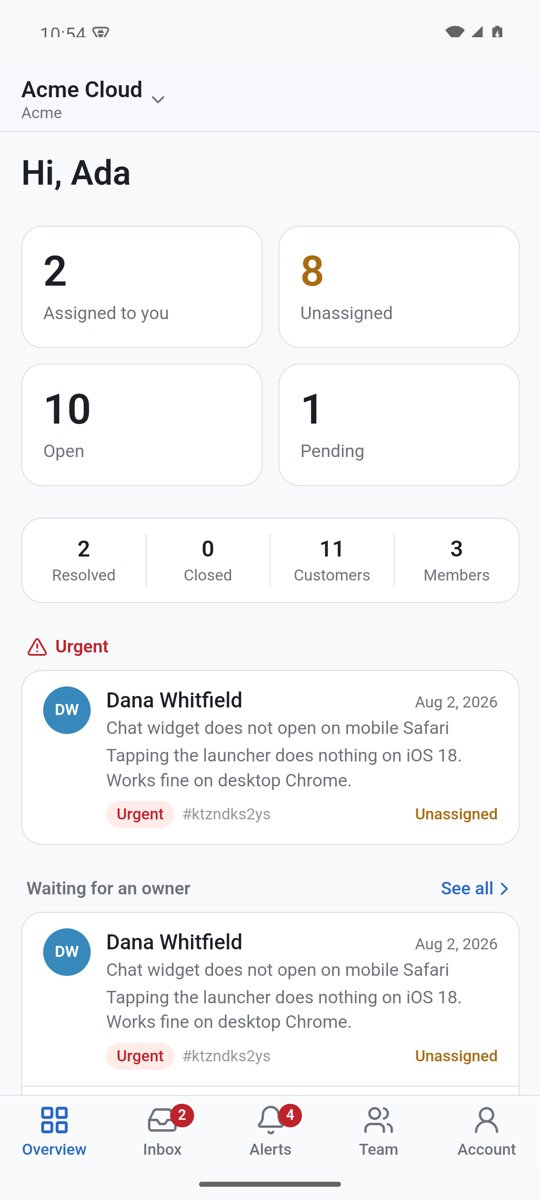
For owners and managers who need to know what is happening while away from the desk. The same workspace as the dashboard, on your phone.
- Push notifications for assignments, mentions and customer replies
- Reply, leave internal notes, assign, prioritise and resolve
- Live counts per view and the queue that is waiting for an owner
- Invite teammates and manage roles
Not in Google Play yet: when the download finishes, your phone asks you to allow installing apps from your browser. iOS is coming.
Scope
Focused on support—not an entire customer-engagement suite.
Email and chat tickets
- Helpwing
- Included
- Traditional support suite
- Included
Chat inside your own app
- Helpwing
- iOS, Android, React Native, Tauri and Unity SDKs
- Traditional support suite
- Usually included
Quick developer setup
- Helpwing
- Core focus
- Traditional support suite
- Varies
API and webhooks
- Helpwing
- First-class
- Traditional support suite
- Often plan-dependent
Complex marketing tools
- Helpwing
- Intentionally excluded
- Traditional support suite
- Common
Enterprise administration
- Helpwing
- Minimal
- Traditional support suite
- Extensive
Setup experience
- Helpwing
- Focused
- Traditional support suite
- Often multi-step
Pricing
Pricing that stays readable.
Try every feature free for 21 days, then pick the plan that fits your ticket volume.
Crypto payments only
- Base
- Ethereum (ERC-20)
Paid plans are settled in stablecoins sent to your organization’s own deposit address. There are no cards, no PayPal and no bank transfers. Access unlocks as soon as the transfer is final on-chain — usually a few minutes.
The exact asset and address are shown at checkout. Anything sent on another chain cannot be recovered.
Mini
For side projects and testing.
Regular price: $2.29Beta −15%$1.99/month
- 1 agent
- 1 project
- 100 tickets/month
- 300 knowledge base queries/month
- 30 AI replies/month
- Email and chat
- API access
- Most popular
Starter
For small SaaS teams.
Regular price: $16Beta −15%$14/month
- 3 agents
- 1 project
- 1,000 tickets/month
- 3,000 knowledge base queries/month
- 300 AI replies/month
- Custom support domain
- Webhooks
- Remove Helpwing branding
Growth
For growing products.
Regular price: $45Beta −15%$39/month
- 10 agents
- 3 projects
- 5,000 tickets/month
- 30,000 knowledge base queries/month
- 1,500 AI replies/month
- Advanced webhook logs
- Remove Helpwing branding
- Priority support
- Extended retention
Plans are billed monthly. Crypto only — no cards. Cancel anytime.
FAQ
Questions worth answering before you sign up.
Create a project, use the Helpwing-provided support address, and you can receive a ticket straight away. Adding website chat is one script tag in your layout. Nothing in that path requires a DNS change or a deploy pipeline.
Yes. Forward an address such as support@company.com to your Helpwing address, or connect a dedicated inbound subdomain if you would rather have mail delivered directly. Both routes produce the same tickets in the same inbox.
Only for the custom inbound domain method, and only on a subdomain such as help.company.com. The instant address and forwarding methods need no MX change at all, so your main domain keeps delivering mail exactly as it does today.
Yes. Call Support.identify() with the user id, email, name and any metadata you want on the record, and the conversation is attached to that customer. Identified visitors keep their ticket history across sessions.
Email on its own is a complete setup — connect an address and every incoming message becomes a ticket with the same status, assignment and history. The widget is an optional second source you can add later without changing how you work.
Replies sent from the inbox go out through Postwing, which handles outbound delivery and delivery events. Agents see delivered, bounced and failed states on the message itself, so a reply that did not arrive is visible in the conversation rather than silently lost.
Yes: a REST API with an OpenAPI specification, scoped API keys, signed webhooks with delivery logs and manual replay, idempotent requests and a TypeScript SDK. The dashboard uses the same product model available through the API.
In crypto, and only in crypto — there are no cards, no PayPal and no bank transfers. Paid plans are settled in stablecoins sent to your organization’s own deposit address on Base or Ethereum, and the exact asset and address are shown at checkout so you can confirm before paying. The plan activates once the transfer is final on-chain, usually a few minutes.
Ticket allowances are counted per month and reset with each billing period. Existing conversations, customers and history stay accessible, and you can move to a plan with a larger allowance at any time.
Yes. Tickets, conversations and customer records are readable through the REST API, so you can take a full copy whenever you want. Nothing about your data depends on staying subscribed.
Receive your first support ticket today.
Connect email or install the widget, invite your team, and start replying from one focused inbox.
- 21-day free trial
- Developer-friendly setup
- Export your data anytime